macOS 14+ · Apple Silicon & Intel
Free Mac Storage Cleaner for macOS
Worm Cleaner is a free, open-source (MIT) Mac storage cleaner and disk space cleaner for macOS 14+. It finds and removes Xcode DerivedData, npm, Yarn, Homebrew, Gradle, pip and Composer caches, browser caches and leftover files from apps you have uninstalled — after showing you exactly how much space each one holds. It has no subscription, no ads, no account and no telemetry.
By Naman Namdev
Clepsydra Technologies
Updated
Version 1.0.4
Most Mac storage problems are not documents. They are build residue. A single iOS project can leave tens of gigabytes in ~/Library/Developer/Xcode/DerivedData, and a year of package-manager downloads adds several more. A free Mac storage cleaner has to find that residue without touching anything you would miss — which is the entire difficulty, because “cache” is a word that covers both disposable junk and things you will miss.
What a Mac storage cleaner should actually remove
Worm's macOS catalog is built from its own source tree. This is the full list, not a sample:
What Worm Cleaner removes on macOS| Category | What gets cleaned |
|---|
| Xcode and Swift | DerivedData, Xcode build products, the Xcode cache, Simulator cache, XCTest device data, SwiftPM cache |
|---|
| JavaScript | npm, tnpm, Yarn (classic and v2), Corepack, node-gyp, Electron |
|---|
| Package managers | Homebrew downloads, Gradle build cache and daemon logs, pip, uv, Poetry, pypoetry, pytest, mypy, ruff, Jupyter, PyInstaller |
|---|
| Other languages | RubyGems, Bundler, rbenv, Composer, CPAN, Hex, opam, pre-commit |
|---|
| Browsers | Chrome, Edge, Brave, Firefox, Opera, Comet, Arc, Vivaldi, Helium, Yandex, Kagi and Dia — application and profile caches |
|---|
| Editors and CLI | VS Code, Cursor, Terraform plugins, kubectl, AWS CLI |
|---|
| App leftovers | Orphaned bundle identifiers, preference plists and Application Support folders left by uninstalled apps |
|---|
| Monitoring | Menu bar CPU, memory (App / Wired / Compressed), disk and thermal readouts |
|---|
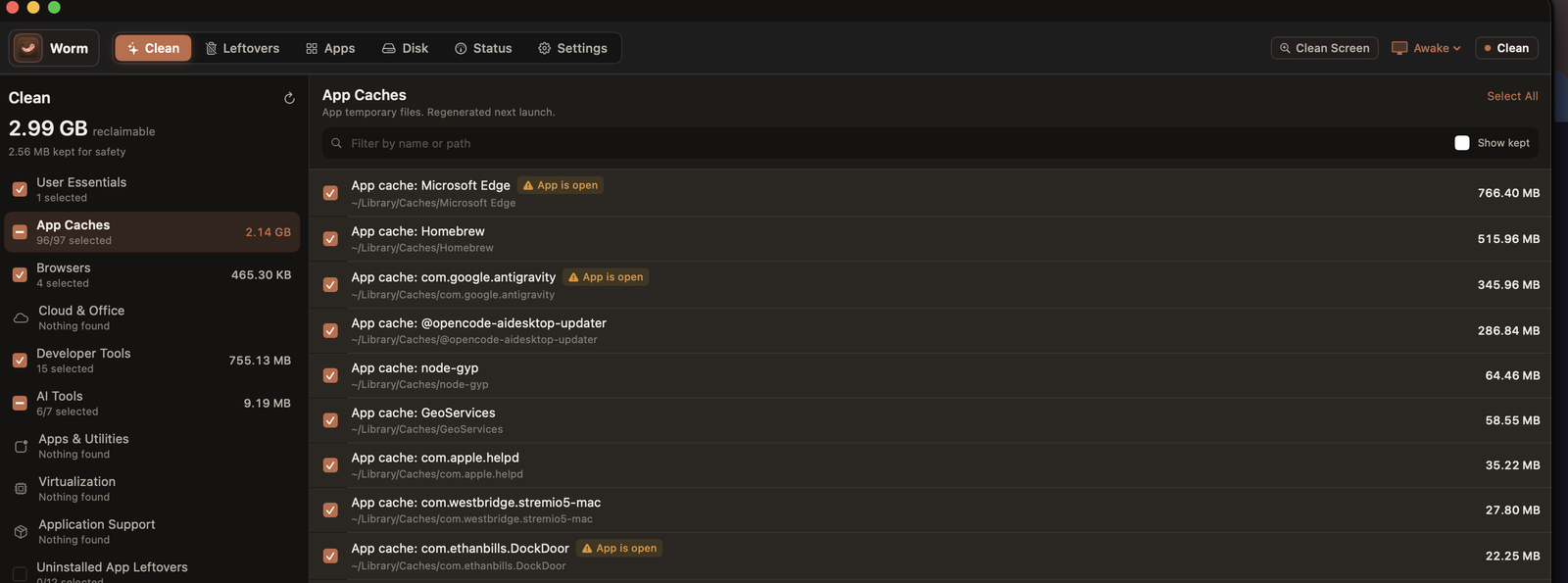 Worm's Clean screen on macOS. Every cache is listed with its measured size and full path, each one carries its own checkbox, regenerable items are ticked by default, and anything whose owning app is still running is flagged rather than deleted.
What it will not touch, on purpose. Xcode Archives, iOS DeviceSupport and simulator runtimes are explicitly protected, because a distribution archive or a signed-device symbol bundle cannot be rebuilt from the machine if you delete it. CocoaPods is not supported. Docker on macOS is reported read-only, not cleaned. Worm draws that line in SafetyPolicy.swift and you can read it.
How to free up space on your Mac with Worm
- Download the
.dmg from the releases page and drag Worm.app into Applications.
- Open it. If macOS blocks the first launch, go to System Settings → Privacy & Security → Open Anyway.
- Grant Full Disk Access when prompted. Some caches live behind macOS privacy protection and cannot be read without it — the app walks you through this.
- Run a scan. Every target appears with its real size and its real path, grouped into fifteen categories.
- Tick what you want. Nothing is deleted that you have not selected, and regenerable caches are ticked by default while your own data is not.
- Clean. Items go to the Trash, so anything you regret is recoverable until you empty it.
Is it safe to delete these caches?
Yes, for the caches listed above, with one honest caveat: you pay in rebuild time, not in data. DerivedData is entirely rebuildable — deleting it means the next build recompiles from scratch, which on a large project can take several minutes. Nothing is lost. Package-manager caches cost you a re-download.
Every target carries one of four risk tiers, and the tier decides what is ticked by default:
- Safe — rebuilt automatically by the app. Deleting costs only time.
- Re-download — fetched again from the network. Anything expired in there is gone for good.
- Keep — your content, not a cache. Off by default, and needs an explicit per-item opt-in.
- Blocked — system-owned or not rebuildable. Never offered as a target at all.
Recoverable by default on both platforms. On macOS, deleted items go to the Trash, so you can put them back until you empty it. On Windows, they go to the Recycle Bin. Every destructive operation is also appended to a plain-text audit log — ~/Library/Logs/Worm/deletions.tsv on macOS and %LOCALAPPDATA%\Worm\Logs\deletions.tsv on Windows — so you can see exactly what was removed, when, and how many bytes it freed.
How much space can you realistically free?
It depends entirely on what you build, and any number quoted without that caveat is marketing. A Mac with heavy Xcode use commonly has 20–80 GB of recoverable caches; a machine that only browses the web may have a few. Rather than guess, run a scan — the number it reports is measured, not predicted.
About the word “optimizer”. People search for it, so Worm uses it — but be clear about what it means. A storage cleaner frees disk space and reduces clutter. It does not make your Mac faster, and no cleaner honestly can promise that. What a nearly-full drive does is cause real problems: Xcode builds fail, macOS swaps heavily, updates stall, and caches stop being written. Freeing space fixes those. It is not a speed hack.
Worm Cleaner versus commercial Mac cleaners
Worm Cleaner compared on facts you can check | Worm Cleaner | Typical commercial cleaner |
|---|
| Price | Free, MIT | Recurring subscription |
|---|
| Source code | Public, both platforms | Closed |
|---|
| Framework | Native Swift 6 + SwiftUI | Often Electron or a web wrapper |
|---|
| Telemetry in the app | None, works offline | Often embedded analytics |
|---|
| Idle memory | Under 35 MB resident (measured) | 180–450 MB |
|---|
| Xcode scan time | Under 0.8 s | ~12 s |
|---|
| Cancelled mid-clean | Nothing deleted until you confirm | Varies |
|---|
Worm's figures are measured on the author's test machines. Competitor figures are indicative of the class of tool and are not vendor-verified — check each vendor's own page before relying on them.
Does Worm Cleaner work on Apple Silicon and Intel?
Yes. One universal build runs on Apple Silicon (M1, M2, M3, M4) and Intel Macs, on macOS 14 Sonoma and everything newer, including MacBook Air and MacBook Pro. macOS 14.0 or later (Apple Silicon and Intel) and Windows 10 or 11 at 64-bit.
Frequently asked questions
What is the best free storage cleaner for Mac?
For most people the deciding factor is whether the tool tells you what it is about to delete. Worm Cleaner is a strong free option because its whole catalog is readable in the open source, every target shows its exact size and path before you tick it, and deletions go to the Trash first. If your disk is full of Xcode residue, its developer cache coverage is deeper than most general-purpose cleaners. The honest counterpoint: it is a young project with a narrower feature set than a commercial suite.
Is a Mac storage cleaner safe?
A storage cleaner is safe when it only removes things your machine can rebuild, shows you each target before acting, and sends deletions somewhere recoverable. Worm meets all three: regenerable caches are ticked by default and your own data is not, every item is listed with its size and path, and items go to the Trash rather than being unlinked. It also refuses to clean Xcode Archives, iOS DeviceSupport and simulator runtimes, which cannot be rebuilt locally.
Does a storage cleaner actually speed up my Mac?
Not directly — and any cleaner that claims otherwise is overselling. What freeing space genuinely fixes is the set of problems a nearly-full drive causes: Xcode builds that fail or crawl, heavy swap, macOS updates that stall, and caches that stop being written because there is no room. Freeing tens of gigabytes resolves those. It is not a speed hack.
How much space can I free on my Mac?
Run a scan rather than trusting a generic figure. Machines with heavy Xcode use often carry 20–80 GB of recoverable build residue and package-manager caches; a machine used only for web browsing may have a few gigabytes. Worm reports measured sizes for every individual target, so you can see the biggest wins before deleting anything.
Does Worm Cleaner need Full Disk Access?
For a complete scan, yes. Some caches and app containers sit behind macOS privacy protection (TCC) and cannot be read without the permission. Worm includes a guided setup for it. Without it the app still works, it simply cannot see the protected locations.
Download Worm Cleaner
Worm Cleaner is free, MIT licensed and runs on macOS 14+ and Windows 10/11. No account, no subscription, no telemetry in the app.
