Trust · Verification · Transparency
Is Worm Cleaner Safe?
Worm Cleaner is not malware and not a self-replicating computer worm. It is a legitimate MIT-licensed disk cleaning utility with public source code for both macOS and Windows. It does not copy itself, does not modify other files, and makes no network calls while cleaning. This page exists so you can verify all of that rather than take it on trust.
By Naman Namdev
Clepsydra Technologies
Updated
Version 1.0.4
The honest summary. A tool called “Worm” that deletes files deserves scepticism, and you should not take a stranger's word for it. Everything below is a step you can perform yourself in a few minutes.
Is Worm Cleaner malware?
No. Worm Cleaner is a disk cleaning utility, not malware and not a self-replicating computer worm. It does not copy itself, does not attach to other files, and has no payload. Its entire source code is public under the MIT licence, so every claim on this page can be checked line by line. The name refers to the earthworm that burrows through soil, which is also the product metaphor: it tunnels past the surface junk into the deeper filesystem strata.
Two things make this verifiable rather than merely asserted. First, the source is public under a permissive licence, so the entire behaviour of both apps is readable — there is no closed binary whose behaviour you have to take on faith. Second, a cleaner that deletes files is trivially dangerous if it has network access, and Worm's has none during cleaning.
How to verify the download yourself
1. Check the SHA-256 checksum
Every published release includes checksums, both in GitHub Releases and on this site. Compare the digest of what you downloaded against the published value:
# macOS
shasum -a 256 ~/Downloads/Worm-Installer.dmg

# Windows PowerShell
Get-FileHash -Algorithm SHA256 Worm-Windows-x64.zip
The published digests for v1.0.4:
6ae5f01072b506e6a6ae19225d5483b63fd53671e6519dea0d4202b9a8e353d1  Worm-Installer.dmg
8addf36453262d6227d1b1c924a253563974e7d0637ed3fda374c007b1232b43  Worm-macOS.zip
0169d3282e79f2cb8c7ff386c379c4c6ad0f07d29efae5267fbae6d17147e6af  Worm-Windows-x64.zip
They are also served as a plain-text file at /SHA256SUMS.txt. If a digest does not match, do not run the file.
2. Read the source, or build it
The whole project is at github.com/namdevnaman/worm. You can read the scan catalog and the safety policy directly — Sources/WormCore/ScanCatalog.swift is the complete list of what can be deleted, and Sources/WormCore/SafetyPolicy.swift is the complete list of what is protected. If you would rather not read Swift, build it yourself:
git clone https://github.com/namdevnaman/worm.git
cd worm
swift build -c release
3. Watch the network
Run Worm under Little Snitch or Wireshark while it scans and cleans. You will see no outbound connections during cleaning. On macOS the only network call in the whole app is the optional update check, and it stays off until you ask for it.
Why does macOS warn me? (And why that is expected)
Why does macOS warn me on first launch? Because Worm is not notarised with an Apple Developer ID. It is an independent project without a paid Apple Developer account, so the build carries no notarisation ticket and Gatekeeper blocks it on first open. This is a packaging gap, not a security finding — it is exactly what an unnotarised binary looks like.
To open it: System Settings → Privacy & Security → Security, then click Open Anyway and authenticate. From Terminal, xattr -cr /Applications/Worm.app clears the quarantine flag.
If you would rather judge the binary than the badge, verify its SHA-256 against the published checksum, read the source, or build it yourself with swift build -c release.
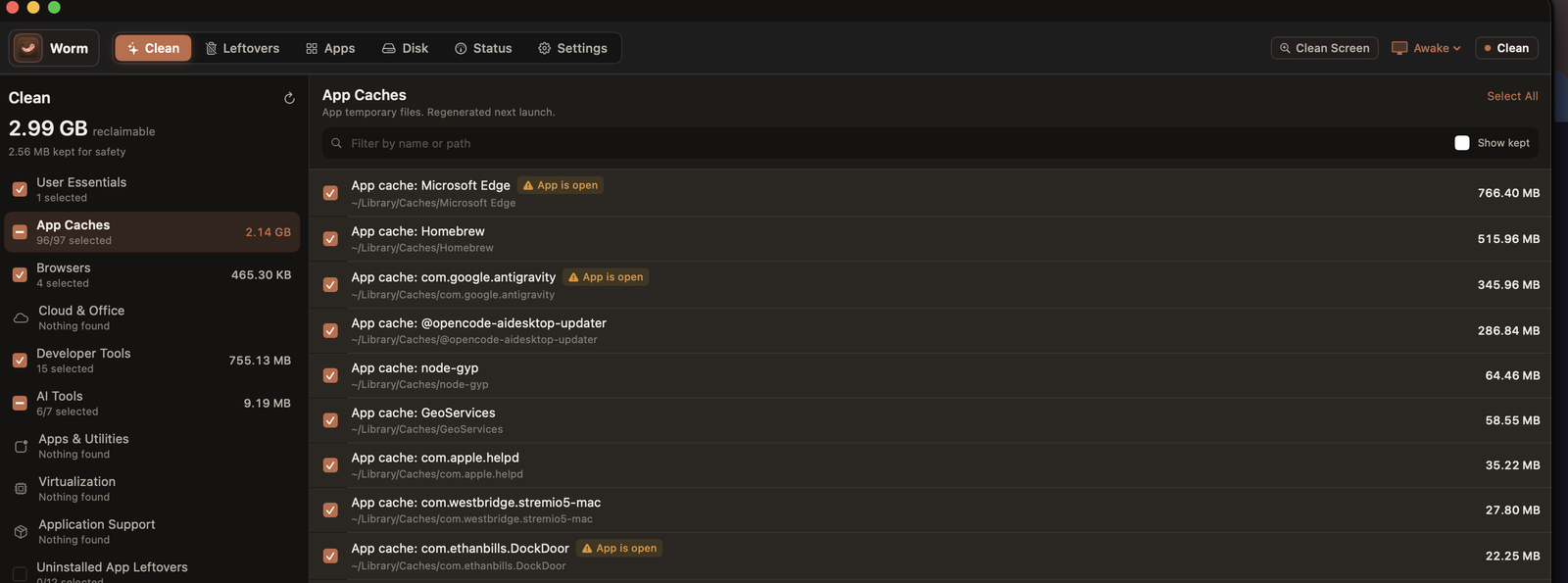 Worm's Clean screen on macOS. Every cache is listed with its measured size and full path, each one carries its own checkbox, regenerable items are ticked by default, and anything whose owning app is still running is flagged rather than deleted.
How Worm protects your files
- Inspect before action. Every target is listed with a per-item checkbox, and cleaning touches only what you ticked.
- Protected paths. Personal folders are resolved through the macOS known-folder APIs and the Windows known-folder registry keys, so a relocated OneDrive or a domain-redirected Documents folder is still protected. Matching is prefix-aware and case-insensitive.
- Running processes warn. An app's cache is cleanable but flagged; an open file handle is never deleted.
- Trash first on macOS, Recycle Bin first on Windows. Recoverable by default.
- Absence verification before flagging leftovers. Only proven orphans are offered.
- Local audit log. Every destructive operation is appended to a plain-text TSV you can read yourself.
- Blast-radius allowlist. Every path a rule produces is checked against a cleanable-root set derived from the rules themselves, so even a wrong rule cannot delete outside a folder the catalog declares cleanable.
- Risk tiers. Regenerable caches default on; your own data defaults off and needs an explicit opt-in; non-rebuildable and system-owned paths are blocked outright.
- Open source. Read the code, build it yourself, verify the claims.
What Worm will never delete
Deliberately excluded paths| Path | Why it is protected |
|---|
~/Library/Developer/Xcode/Archives | Holds shipped distribution binaries; not rebuildable from the machine |
|---|
~/Library/Developer/Xcode/iOS DeviceSupport | Symbol bundles for physical devices |
|---|
~/Library/Developer/CoreSimulator/Profiles/Runtimes | Installed simulator runtimes; multi-gigabyte re-download |
|---|
C:\Windows\SoftwareDistribution | Windows Update download tree; age cannot prove inactivity |
|---|
| Your personal folders | Resolved via known-folder APIs and prefix-matched, case-insensitively |
|---|
| Visual Studio, .NET runtimes and SDKs | Protected components; cannot be uninstalled from the app list |
|---|
Anything classified Keep | Your content, not a cache. Off by default, explicit opt-in required |
|---|
The privacy question, precisely
Zero for the app itself. Worm Cleaner ships no telemetry and no analytics, and it makes no network calls while cleaning — you can verify that with Little Snitch, Wireshark, or by reading the MIT-licensed source. To be exact about the website you are reading: it uses Vercel Web Analytics, which sets no cookies, stores no personal data and needs no consent banner. That counts page views on worm.clepsydratechnologies.com only and is unrelated to the app.
Memory footprint is also worth stating plainly rather than rounding down: under 35 MB resident on macOS and under 42 MB on Windows, measured while idle.
Where you can report a problem
Security issues go to the repository's private security advisory rather than a public issue. Everything else is on the issue tracker, and both are read.
Frequently asked questions
Is Worm Cleaner malware, or a computer worm?
No. Worm Cleaner is a disk cleaning utility, not malware and not a self-replicating computer worm. It does not copy itself, does not attach to other files, and has no payload. Its entire source code is public under the MIT licence, so every claim on this page can be checked line by line. The name refers to the earthworm that burrows through soil, which is also the product metaphor: it tunnels past the surface junk into the deeper filesystem strata.
How do I verify that a Worm download is genuine?
Compare its SHA-256 digest against the published checksums, which appear both in GitHub Releases and at /SHA256SUMS.txt on this site. Run `shasum -a 256 Worm-Installer.dmg` on macOS or `Get-FileHash -Algorithm SHA256 Worm-Windows-x64.zip` in PowerShell. Beyond that, read the source at github.com/namdevnaman/worm or build it yourself with `swift build -c release`.
Why does macOS say it cannot verify Worm is free of malicious software?
Because Worm is not notarised with an Apple Developer ID — it is an independent project without a paid Apple Developer account, so the build carries no notarisation ticket and Gatekeeper blocks it on first open. That is a packaging gap, not a security finding. Open it via System Settings > Privacy & Security > Open Anyway, or clear the quarantine flag with `xattr -cr /Applications/Worm.app`.
Does Worm Cleaner collect any telemetry or personal information?
Zero for the app itself. Worm Cleaner ships no telemetry and no analytics, and it makes no network calls while cleaning — you can verify that with Little Snitch, Wireshark, or by reading the MIT-licensed source. To be exact about the website you are reading: it uses Vercel Web Analytics, which sets no cookies, stores no personal data and needs no consent banner. That counts page views on worm.clepsydratechnologies.com only and is unrelated to the app.
Can I undo a cleanup?
Recoverable by default on both platforms. On macOS, deleted items go to the Trash, so you can put them back until you empty it. On Windows, they go to the Recycle Bin. Every destructive operation is also appended to a plain-text audit log — ~/Library/Logs/Worm/deletions.tsv on macOS and %LOCALAPPDATA%\Worm\Logs\deletions.tsv on Windows — so you can see exactly what was removed, when, and how many bytes it freed.
Is it safe to delete the caches Worm lists?
The safe ones, yes — they are regenerable or re-downloadable by definition, which is why each target carries a risk tier and regenerable caches are ticked by default. The distinction that matters is between a cache and something you cannot rebuild: Worm blocks Xcode Archives, iOS DeviceSupport, simulator runtimes and the Windows Update tree precisely because deleting those loses data. Your own files are classified Keep, which is off by default and requires an explicit opt-in.
Download Worm Cleaner
Worm Cleaner is free, MIT licensed and runs on macOS 14+ and Windows 10/11. No account, no subscription, no telemetry in the app.
