Xcode & iOS development
How to Clear Xcode DerivedData Safely
Xcode DerivedData is a cache of compiled intermediate files, and it is safe to delete. It lives in ~/Library/Developer/Xcode/DerivedData, it is rebuilt automatically on your next build, and it is frequently the single largest reclaimable directory on a Mac used for iOS development. Worm Cleaner lists it with its exact size, alongside the other Xcode caches, so you can see what deleting it costs before you do it.
By Naman Namdev
Clepsydra Technologies
Updated
Version 1.0.4
DerivedData holds the object files, index data and module caches Xcode produces while compiling. Xcode is aggressive about keeping it, because reusing it is what makes incremental builds fast. That is exactly why it grows without bound: every branch, every dependency change and every Swift version leaves something behind.
Is it safe to delete DerivedData?
Yes. DerivedData is regenerated from your source on the next build. The cost is wall-clock time on that one build — on a large project, expect several minutes for a cold rebuild instead of seconds. Nothing in your repositories, git history or project files is touched, because none of it lives in DerivedData.
The one caveat worth knowing: if you delete it while Xcode is open, the running instance can behave oddly. Close Xcode first, or let Worm's liveness check flag the target as in-use and skip it.
Three ways to clear it
1. The free GUI — Worm Cleaner
Scan, and DerivedData appears in the Developer Tools group with its measured size and full path. Tick it, clean, done. The same scan shows the neighbouring Xcode targets — the Xcode cache, Xcode build products, Simulator cache, XCTest device data and SwiftPM cache — so you can take all of it in one pass rather than hunting directory by directory.
2. Xcode's own setting
In Xcode: Settings → Locations → Derived Data → the arrow next to the path. That opens the folder in Finder so you can drag it to the Trash yourself. It works, but it is one directory at a time and gives you no sizes.
3. From Terminal
rm -rf ~/Library/Developer/Xcode/DerivedData/*
Fast and scriptable, and it bypasses every safety check Worm would apply. There is no confirmation step, no size report and no Trash, so if you have the path slightly wrong you will not find out until it is gone. Use it when you know exactly what you are doing.
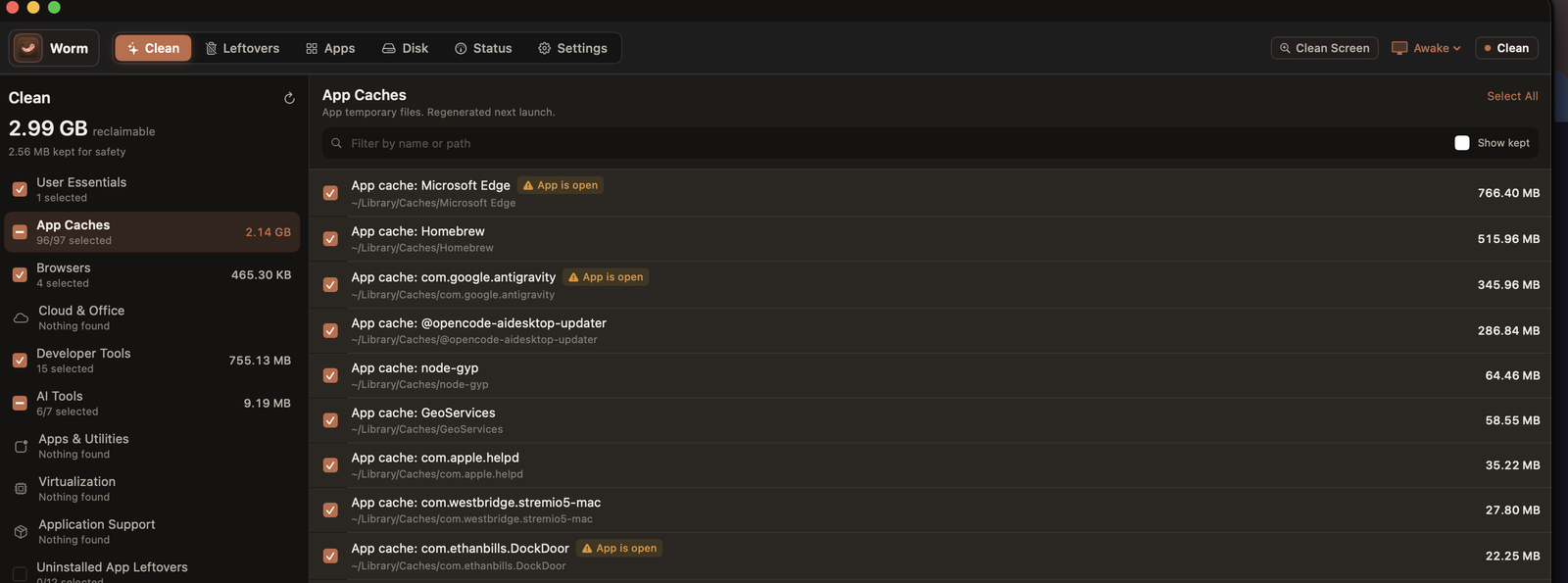 Worm's Clean screen on macOS. Every cache is listed with its measured size and full path, each one carries its own checkbox, regenerable items are ticked by default, and anything whose owning app is still running is flagged rather than deleted.
What else should you delete alongside it?
Xcode-adjacent directories, and whether Worm cleans them| Path | What it is | Worm treats it as |
|---|
~/Library/Developer/Xcode/DerivedData | Compiled intermediate build products | Safe — cleaned |
|---|
~/Library/Developer/Xcode/Products | Build products from the current workspace | Safe — cleaned |
|---|
~/Library/Caches/com.apple.dt.Xcode | Xcode's own cache | Safe — cleaned |
|---|
~/Library/Developer/CoreSimulator/Caches | Simulator runtime caches | Safe — cleaned |
|---|
~/Library/Developer/XCTestDevices | XCTest device data | Safe — cleaned |
|---|
~/Library/Caches/org.swift.swiftpm | SwiftPM package cache | Re-download — cleaned |
|---|
~/Library/Developer/Xcode/Archives | Your distribution archives | Blocked — protected |
|---|
~/Library/Developer/Xcode/iOS DeviceSupport | Symbols for physical devices | Blocked — protected |
|---|
~/Library/Developer/CoreSimulator/Profiles/Runtimes | Installed simulator runtimes | Blocked — protected |
|---|
The bottom three are the ones most “cleaners” will happily delete for you. They are not caches in any recoverable sense: an archive holds the binary you already shipped, device support holds symbol files for hardware that may not be re-attached, and simulator runtimes are multi-gigabyte downloads. Worm refuses all three, and SafetyPolicy.swift is where that decision lives.
Why is Xcode taking so much space?
Four usual reasons, in order of how often they are the culprit:
- Accumulated DerivedData across every project you have opened. Each project gets its own subdirectory, and none are evicted when you stop using them.
- Dependency churn. Every new version of a Swift package adds index and module data.
- Multiple Xcode versions. Switching between Xcode releases leaves caches for the ones you no longer use.
- Simulator runtimes. Each iOS runtime is several gigabytes. Worm will not delete these for you; remove unused ones from Xcode → Settings → Platforms instead.
How to stop it coming back
- Delete DerivedData for a project you have genuinely finished with, rather than letting it accumulate indefinitely.
- Prune unused simulator runtimes and device pairs from Xcode → Settings → Platforms.
- Keep dependencies current — a stale package tree is a large index for code you no longer build.
- Run a scan every few weeks. Ten seconds of scanning is cheaper than discovering the problem during a release build.
Frequently asked questions
Is it safe to delete Xcode DerivedData?
Yes. DerivedData contains only compiled intermediate files that Xcode regenerates from your source on the next build. Deleting it costs build time — a cold rebuild on a large project can take several minutes — and nothing else. Your source repositories, git history and project files are untouched, because none of them live in that directory. Close Xcode before deleting so the running instance does not write to a folder that is disappearing underneath it.
Is it safe to delete Xcode Archives?
Do not delete them casually, and know that Worm will not do it for you. Archives hold the distribution binaries you have already shipped or are about to ship, and they cannot be rebuilt from your machine — only re-signed from source, if you still have it. Worm classifies ~/Library/Developer/Xcode/Archives as protected and never offers it as a cleanup target.
How do I delete DerivedData from Terminal?
Run: rm -rf ~/Library/Developer/Xcode/DerivedData/* — Close Xcode first. This is fast and effective, but it has no confirmation prompt, no size report and no Trash, so a mistyped path is unrecoverable. If you would rather see what you are deleting, run a scan in Worm Cleaner, which reports each target's size and path before anything is removed.
How much space does DerivedData usually take?
It depends on how many projects you have opened and how often you switch branches. A single active iOS project commonly accumulates several gigabytes, and a machine with a year of accumulated history across many projects can reach tens of gigabytes. Measure rather than estimate — a scan reports the real number for your machine.
Does deleting DerivedData break my project or signing?
No. DerivedData holds no source code, no project settings and no signing material. Code signing certificates and provisioning profiles live in your login keychain and in ~/Library/MobileDevice, neither of which is a cleanup target. Your project will rebuild and re-sign normally; it will just take longer the first time.
Download Worm Cleaner
Worm Cleaner is free, MIT licensed and runs on macOS 14+ and Windows 10/11. No account, no subscription, no telemetry in the app.
