Honest comparison · 2026
Best Free Mac Cleaners in 2026
There are several genuinely free Mac cleaners, and they are not interchangeable. Some are narrow open-source tools that do one job well, some are system-maintenance suites with optimisation features a Mac does not need, and some are the free tier of a subscription product. This comparison covers what each actually cleans, what it costs in memory, and where each one is the wrong choice.
By Naman Namdev
Clepsydra Technologies
Updated
Version 1.0.4
Disclosure: this page is written by the author of Worm Cleaner. We have tried to make it useful rather than flattering, which is why it spends as much time on where Worm is the weaker option as on where it wins. Every claim about Worm is verifiable from its repository; claims about other tools are characterised by category, not asserted, and you should check each vendor's own page.
The three kinds of free Mac cleaner
Sorting the options makes the choice much easier, because most “best Mac cleaner” lists mix categories and compare them on the wrong axes.
- Dedicated open-source cleaners. One job, no telemetry, no subscription. Mole and Worm are in this group, as are narrower CLI tools.
- Single-purpose uninstallers. AppCleaner and similar: excellent at removing one app's leftovers, and they do nothing else.
- Free tiers of commercial suites. CleanMyMac, MacCleaner and similar. Feature-rich, subscription-based, and the free tier is usually the same binary with the upsell left in.
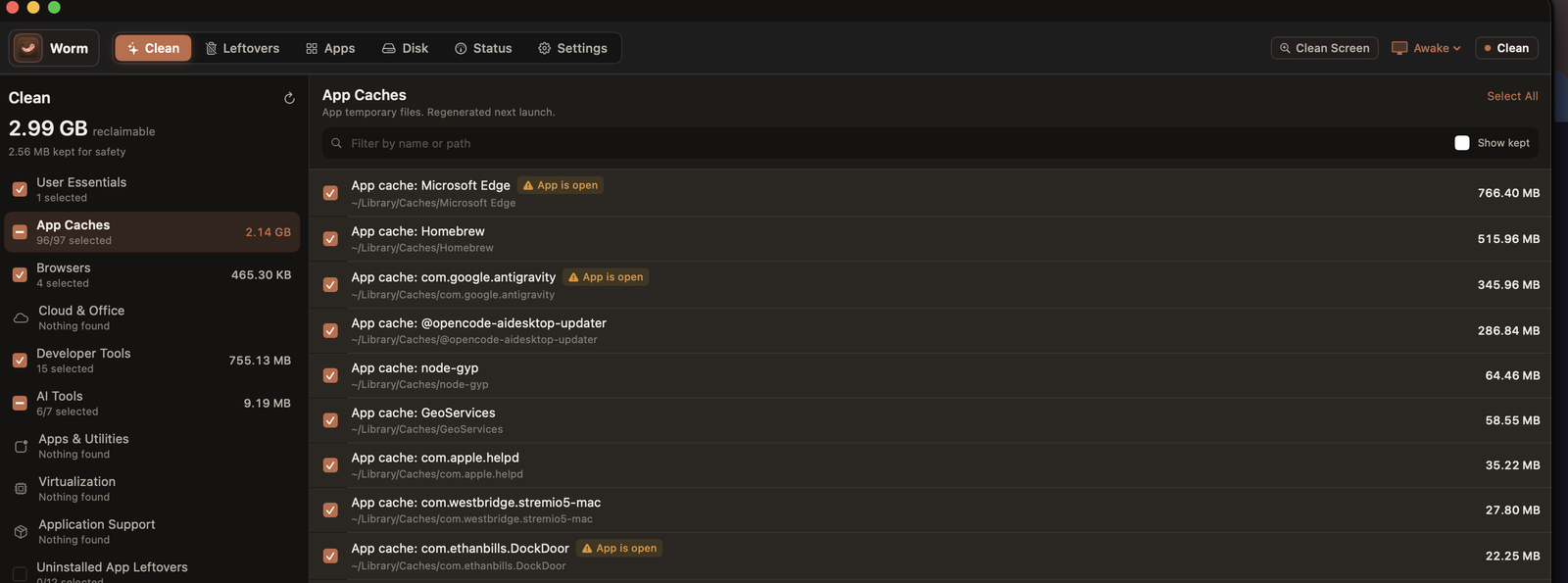 Worm's Clean screen on macOS. Every cache is listed with its measured size and full path, each one carries its own checkbox, regenerable items are ticked by default, and anything whose owning app is still running is flagged rather than deleted.
Comparison
Free Mac cleaners by approach | Worm Cleaner | Dedicated open-source cleaners (e.g. Mole) | Single-purpose uninstallers | Commercial suites (free tier) |
|---|
| Price | Free, MIT | Free, MIT | Free | Subscription, free tier |
|---|
| Developer caches | Deep | Yes | No | General purpose |
|---|
| App leftovers | Yes, with absence verification | Yes | Yes, its core purpose | Yes |
|---|
| Windows build | Yes | Varies | No | Rarely |
|---|
| System monitor | Yes, native | Varies | No | Often |
|---|
| Source available | Yes | Yes | No | No |
|---|
| Telemetry in app | None | None | None | Varies — check |
|---|
| Subscription needed | No | No | No | For full features |
|---|
Where Worm Cleaner is the weaker choice
Stated plainly, because a comparison that only lists strengths is marketing:
- It is young and narrowly scoped. It does not do malware scanning, file-system optimisation, login-item management, startup-item control or scheduled cleaning. Commercial suites do, and for some people that is the whole point.
- Fewer integrations. A large project with a long history may have drivers and quirks that a small catalog has not encountered.
- No sign-in, no sync, no support SLA. There is a GitHub issue tracker and a real person reading it, which is not the same as a support department.
- macOS is not notarised. Gatekeeper blocks the first launch until you click through. Annoying, and a genuine reason some people will not use it.
- Single maintainer. Worm is one person's project. That is a real bus-factor consideration, and it is worth weighing against the fact that the source is public so it could be picked up.
Where Worm Cleaner is the stronger choice
Equally plainly: developer cache coverage is deeper than any general-purpose cleaner we are aware of, spanning Xcode, npm, Homebrew, Gradle, pip, Composer, Terraform and more, each listed as a separate measurable target. It is the only option here with a Windows build of comparable depth. It classifies every target into four risk tiers so the default selection is defensible. It performs positive absence verification before flagging an app's leftovers. It is native on both platforms, under 35 MB idle on macOS. And it is MIT licensed with the source public, so every claim here can be checked.
How to choose
- Your disk is full of Xcode or node_modules residue? A developer-focused cleaner. This is where the category actually differentiates.
- You mostly want to remove one app properly? A single-purpose uninstaller is the simplest tool for that.
- You want malware scanning and scheduled maintenance? A commercial suite, and accept the subscription.
- You care about what is deleted? Open source, full stop. You can read the catalog and confirm the exclusion list yourself.
- You have both a Mac and a PC? A cross-platform tool saves installing two.
What actually helps your Mac run better
About the word “optimizer”. People search for it, so Worm uses it — but be clear about what it means. A storage cleaner frees disk space and reduces clutter. It does not make your Mac faster, and no cleaner honestly can promise that. What a nearly-full drive does is cause real problems: Xcode builds fail, macOS swaps heavily, updates stall, and caches stop being written. Freeing space fixes those. It is not a speed hack.
In practice: keep 15–20% of your volume free, leave about 20 GB for system updates, restart more often than you think you need to, and check what is actually large before deleting anything. A storage cleaner helps when it removes genuinely disposable residue. It does not substitute for knowing where your disk went.
Frequently asked questions
What is the best free Mac cleaner?
It depends on what is filling your disk. For developer caches — Xcode, npm, Homebrew, Gradle — a developer-focused open-source cleaner is the only category that genuinely differentiates, and Worm Cleaner is built for that. For removing one app's leftovers, a single-purpose uninstaller is simpler. For malware scanning and scheduled maintenance you need a commercial suite. There is no single answer, which is why most 'best Mac cleaner' lists are not much use.
Do Mac cleaners actually work?
The cleaning part does, reliably, for genuinely disposable residue: build caches, package-manager caches, logs, crash dumps, old application state and leftover files from uninstalled apps. That can be tens of gigabytes. What cleaners cannot do is make your Mac faster. They also cannot recover space that is genuinely in use by your documents, photos or projects, and the advertised 'frees up 40 GB instantly' figures usually mean the tool counted things twice.
Do I need a Mac cleaner at all?
Probably not as a routine habit. macOS manages its own caches adequately, and Storage Settings plus a monthly look at what is large covers most people. A cleaner earns its place when you have a specific problem — a full disk after heavy development, or accumulated leftovers from apps you removed over the years. If your disk is not full and nothing feels slow, you do not need one.
Are free Mac cleaners safe?
The category spans safe to genuinely risky, and the variable is whether you can verify what it deletes. Open-source tools let you read the catalog and the exclusion list; closed free tiers of commercial products ask for trust you cannot check, and historically the free tier of some well-known cleaners was the distribution vector for adware. The practical test: does it show you every target with its size and path before deleting, does it send deletions somewhere recoverable, and can you read what it refuses to touch?
Is Worm Cleaner really the best free Mac cleaner?
It is the best free option if your disk is full of developer build residue, and it is competitive on footprint and transparency generally. It is not the best if you need malware scanning, scheduled cleaning, startup-item management or broad system maintenance — it does not attempt those. We have set out the full list of its weaknesses above rather than leaving you to discover them.
Download Worm Cleaner
Worm Cleaner is free, MIT licensed and runs on macOS 14+ and Windows 10/11. No account, no subscription, no telemetry in the app.
